To share a ChatGPT conversation, open it, choose Share, then copy the link and send it. Anyone with the link can read the whole chat, your questions included. If the other person only needs the result, say “make this a Linkit” instead: one link to a page with just the answer, made for their phone.
The whole conversation. According to OpenAI's own shared links FAQ:
Anyone with the link can open it
For personal accounts. There's no way to limit it to certain people.
As it was when you made the link
New messages aren't added on their own. To show them, you update the link.
No expiry date
To stop it, you delete the link.
People with ChatGPT can carry it on
They can continue the conversation in their own account.
The catch: a share link sends the whole conversation. Every question you asked, every draft, every detour. It's a lot when your family just needs the plan.
What we measured
How long is a whole chat on a phone?
We took a real trip plan made in an AI chat: four days in Kyoto for five people. It came to 1,551 words and 31 photos. On a phone, the words alone fill 19 screens.
Plan 4 days in Kyoto for 5 of us
KYOTO · APRIL · 5 OF US Four days of eating our way through Kyoto Temples in the morning, food all day, one big Osaka night. Mid-budget, mostly walkable, timed for cherry blossom season. days food stops Osaka day trip Day 1 Day 2 Day 3 · Osaka Day 4 Map Good to know OK team, here's the plan 👇 Each day sticks to one part of town …
1 of 19
he city. Mornings start early at the famous spots before the crowds, and every day is built around where we eat. Green dots are food. Tap any photo to see it big, and every place has a map link. DAY 1 Fox shrine, old lanes & Gion DAY 2 Bamboo, tofu & the Golden Pavilion DAY 3 Osaka: eat till we drop DAY 4 Sakura walk & market gr…
2 of 19
TO Ten thousand gates, then Gion at dusk Beat the crowds up Fushimi Inari, ride one stop to Kiyomizu, wander downhill through the old lanes into Gion, and end with dinner on Pontocho. 7:00 Fushimi Inari Taisha The tunnels of orange torii. It's open all day, every day, so going early means photos without a hundred strangers in th…
3 of 19
oup feels like; the crowds thin out fast as you climb. Free Open 24h 9:00 Vermillion Espresso Bar Coffee, matcha and pastries steps from the main gate. Full English menu with pictures. Coffee break 9am–5pm 10:30 Kiyomizu-dera → Sannenzaka & Ninenzaka Keihan train from Fushimi-Inari to Kiyomizu-Gojo, then uphill to the temple's w…
4 of 19
alk back down through the stone-stepped lanes toward the Yasaka Pagoda. 13:00 Issen Yoshoku, Gion A one-dish shop: a folded Kyoto-style savoury pancake with beef, egg, spring onion and ginger. Look for the red lanterns and the open kitchen. Filling and cheap. Lunch Budget 14:00 Gion Shirakawa, Hanamikoji & Maruyama Park The will…
5 of 19
street, then Maruyama Park's big weeping cherry. If there's a maiko, give her space: no stopping her or photos, and some Hanamikoji side lanes ban photography. 16:00 Gion Tsujiri, main store Matcha soft serve with condensed milk. Short walk from Gion-Shijo Station. Snack ¥820 18:00 Dinner: Pontocho Izumoya Sukiyaki and shabu-sha…
6 of 19
t alley; easy for a group, with kids' meals too. Takes phone bookings, so book for 5. Dinner From ¥3,960 Book ahead Open Day 1 route in Google Maps ↗ ARASHIYAMA & NORTHWEST Bamboo before breakfast, tofu for lunch Arashiyama early, a slow Zen-temple tofu lunch, the Golden Pavilion in the afternoon light, then beef cutlets and mat…
7 of 19
n. 7:30 Arashiyama Bamboo Grove Go early: by mid-morning it's shoulder to shoulder. Free to walk through. 9:00 Tenryu-ji & Togetsukyo Bridge Zen temple garden next to the grove, then the riverside and bridge. Cherry trees line the river here in early April. 11:30 Lunch: Yudofu Sagano Arashiyama's Buddhist specialty: silky tofu s…
8 of 19
ead of side dishes. Near Tenryu-ji; closes 5:30pm. Lunch Moderate 14:00 Kinkaku-ji, the Golden Pavilion Cross-town by bus or taxi (we're 5, so that's two taxis or one large one). The gold leaf glows in afternoon sun over the pond. 18:00 Dinner: Gyukatsu Kyoto Katsugyu Crispy beef cutlets served pink; you sear each slice to your …
9 of 19
. Kyoto-born chain with branches at Kyoto Station and Pontocho. No bookings, English menu. Dinner Sets from ~¥2,000 20:00 Nakamura Tokichi, Kyoto Station Dessert: the tall Maruto parfait in matcha or hojicha. Inside the station building (3F); café open till 10pm. Dessert ¥1,980 Open Day 2 route in Google Maps ↗ DAY TRIP · OSAKA …
10 of 19
Osaka is Japan's kitchen, and it's half an hour away. Market grazing, a castle to walk it off, deep-fried skewers, and Dotonbori's neon at night. ~29′ JR Special Rapid, Kyoto → Osaka, ¥580. Then the Midosuji subway south toward Namba. 10:00 Kuromon Ichiba Market 150+ stalls. Graze: grilled oysters, tuna cut to order, sea urchin …
11 of 19
is the sweet spot before the tour groups arrive. Pace yourselves. Brunch crawl 12:30 Osaka Castle Park Walk off the market in the castle grounds. A classic spring cherry blossom spot. 15:00 Shinsekai: Kushikatsu Daruma The original deep-fried skewer shop, under Tsutenkaku tower. Pork, prawn, lotus root, quail egg. One rule: dip …
12 of 19
ever twice. Cash only. Late lunch ~¥1,500–3,000 Cash only 18:00 Dotonbori + Okonomiyaki Mizuno Neon, the Glico runner, takoyaki from a street stall, then Osaka okonomiyaki at Mizuno (since 1945, Michelin Bib Gourmand). Walk-in only: they take your name and order while you wait; 20–45 min at peak. Dinner ~¥1,500–3,000 Queue Open …
13 of 19
NORTHERN HIGASHIYAMA & DOWNTOWN Cherry blossom walk, then one last feast The Silver Pavilion, thick udon, the canal path under the blossoms, a brick aqueduct, Nishiki Market, and wagyu for the farewell dinner. 8:30 Ginkaku-ji, the Silver Pavilion Moss garden and raked sand cone, quieter than its golden cousin. 11:00 Lunch: Omen …
14 of 19
in hot or cold broth with seasonal sides, on tatami downstairs or tables upstairs. English menu. Be there at the 11am opening: in sakura season the line goes out the door. Lunch Moderate Go at opening 12:30 Philosopher's Path → Nanzen-ji A canal walk lined with cherry trees, south to Nanzen-ji's red-brick aqueduct. One of the ci…
15 of 19
:30 Nishiki Market "Kyoto's kitchen": pickles, fresh yuba, octopus-and-quail-egg skewers, wagashi. Weekday afternoons after 3 are calmer. Most shops close around 6pm. Eat at the stall you bought from. Graze Snacks ~¥300–800 19:00 Farewell dinner: Yamakawa Honten Wagyu yakiniku in Pontocho to end the trip properly. Books online. …
16 of 19
ook ahead Open Day 4 route in Google Maps ↗ The map Pick a day, tap a stop to drop the pin. Day 1 Day 2 Day 3 · Osaka Day 4 Fushimi Inari Taisha 7:00 · torii gates Vermillion Espresso Bar 9:00 · coffee Kiyomizu-dera 10:30 · temple & lanes Issen Yoshoku 13:00 · lunch Gion Shirakawa 14:00 · canal walk Gion Tsujiri 16:00 · matcha s…
17 of 19
8:00 · dinner Sights Food Good to know 🌸 When the blossoms peak + Kyoto usually peaks in early April. This year most of the big spots (Maruyama Park, Kiyomizu-dera, Arashiyama) peaked around April 4, with the Philosopher's Path around April 7. Later varieties hang on into mid-April. It moves with the weather, so we watch the for…
18 of 19
and avoid Golden Week + 🍽 Eating as a group of 5 + 🚕 Getting around + 🎎 Optional: maiko spring dance + またね See you in Kyoto. Reply in the chat with anything you'd swap. Info from insidekyoto.com, explore.osaka, fun-japan.jp, magical-trip.com, japanesetaste.com, selfguidejapan.com, japantravel.com, mileasia.com. Hours and prices …
19 of 19
← Scroll through all 19. Then imagine sending them. →
The same plan, as one Linkit page.
19screens of text, plus 31 photos to send
1link, with everything on one page
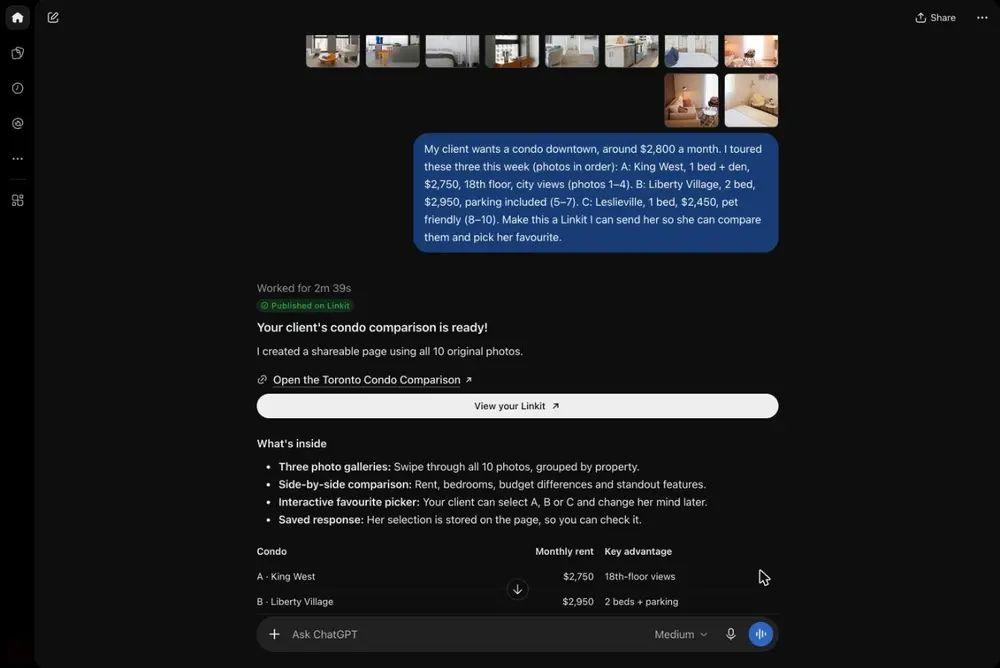
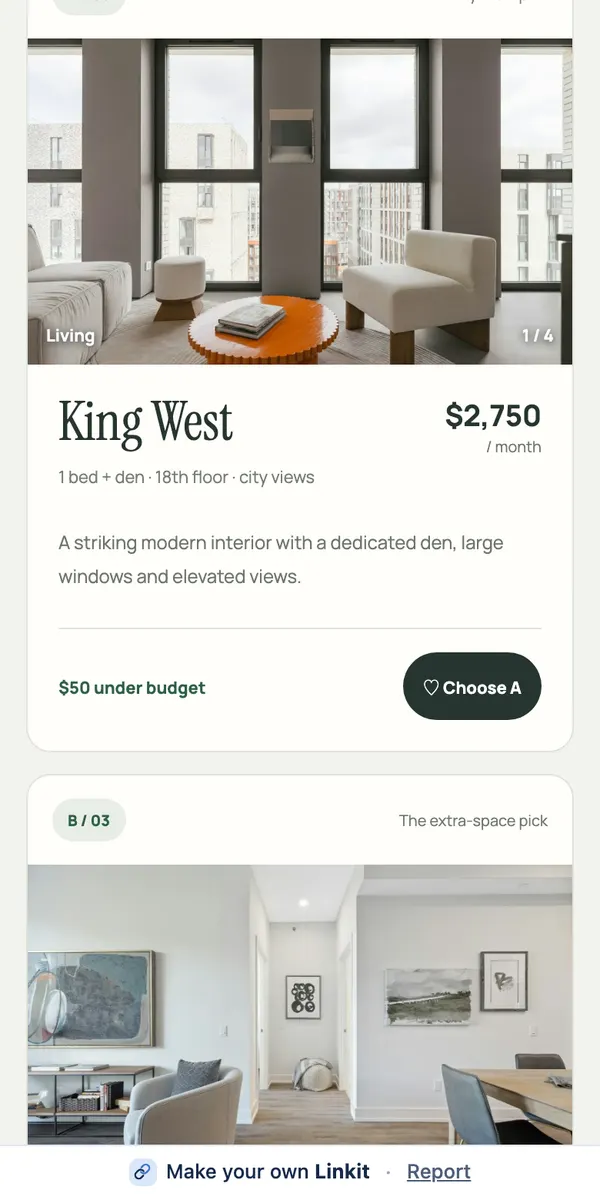
Two more from our tests: a shortlist of three condos is 6 screens of text plus 10 photos. A kids' soccer season with snack and carpool sign-ups is about 7.
The other way: Linkit
How do I send just the answer?
1
Connect once
Connect Linkit to ChatGPT in a web browser (not the app). About a minute; free accounts work.
ChatGPT replies with a link. It opens in any browser, no account needed. Ask for changes later; the link stays the same.
Ready to copy
Type this under the answer.
The page holds only that answer, not the chat around it. Add who it's for: “for the group chat”, “for my client, with the photos big”.
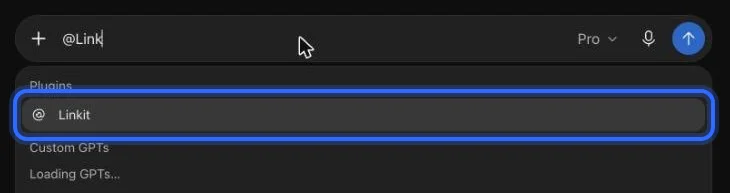
@Linkit Make this a Linkit. Keep it clear and easy to read on a phone.
In ChatGPT: type @Linkit, pick it, then your line.
Step 1, in pictures
How do I connect Linkit to ChatGPT?
Once, in a web browser at chatgpt.com (not the app; a phone's browser works too); it takes about a minute. These are the real screens, with a ring on what to press. The address to paste:
https://app.linkitapp.ai/mcp
1
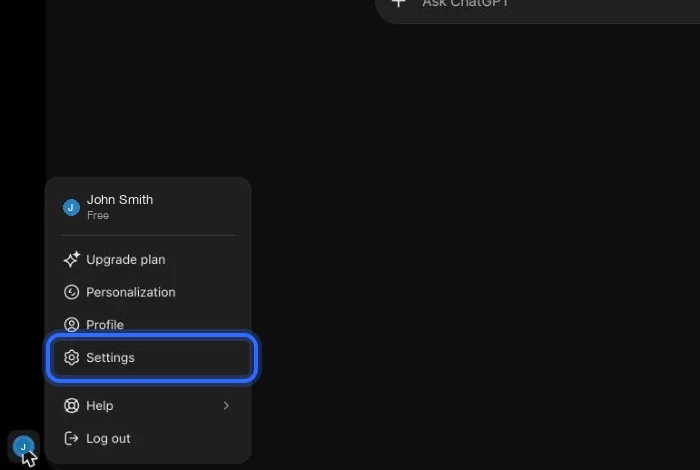
On chatgpt.com, open your profile menu (bottom left) and choose Settings.
2
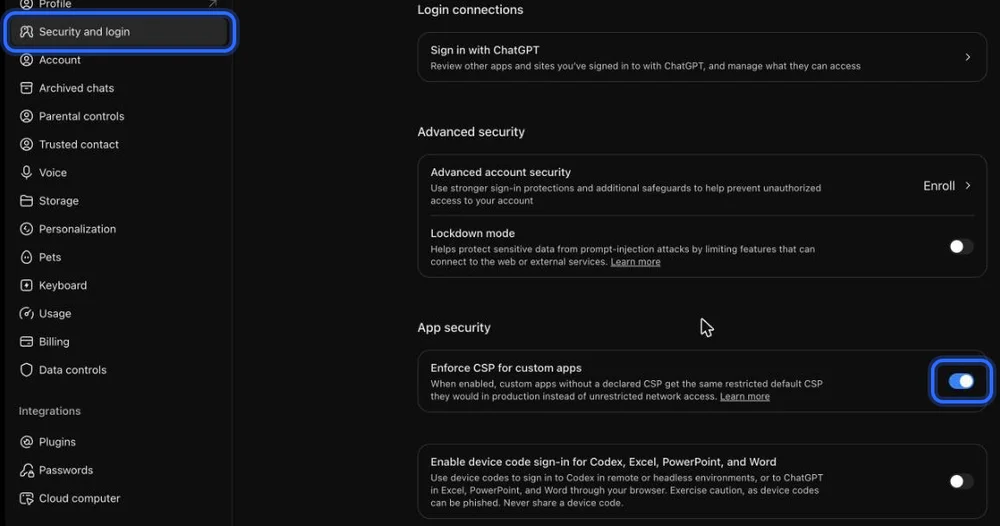
Choose Security and login, scroll to App security, and turn on “Enforce CSP for custom apps”. If you don't see it, skip this step.
3
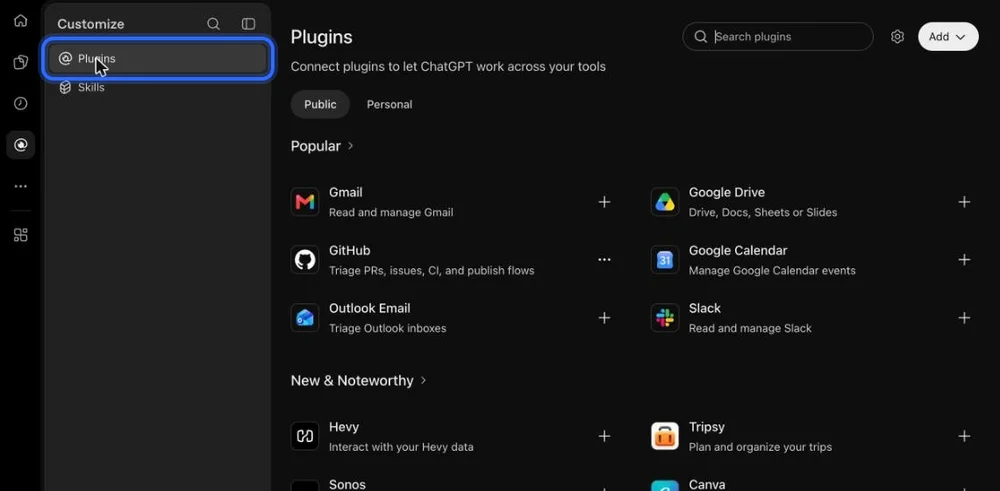
Go back and open Plugins in the left sidebar.
4
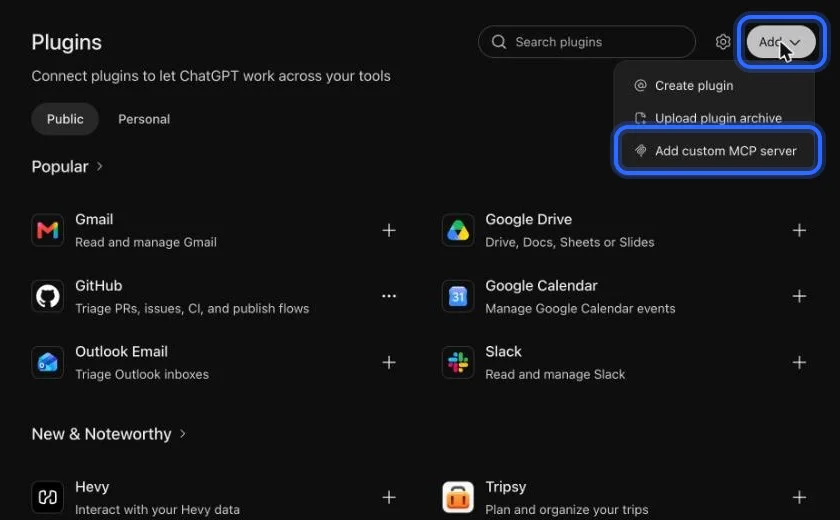
Choose Add, then “Add custom MCP server”.
5
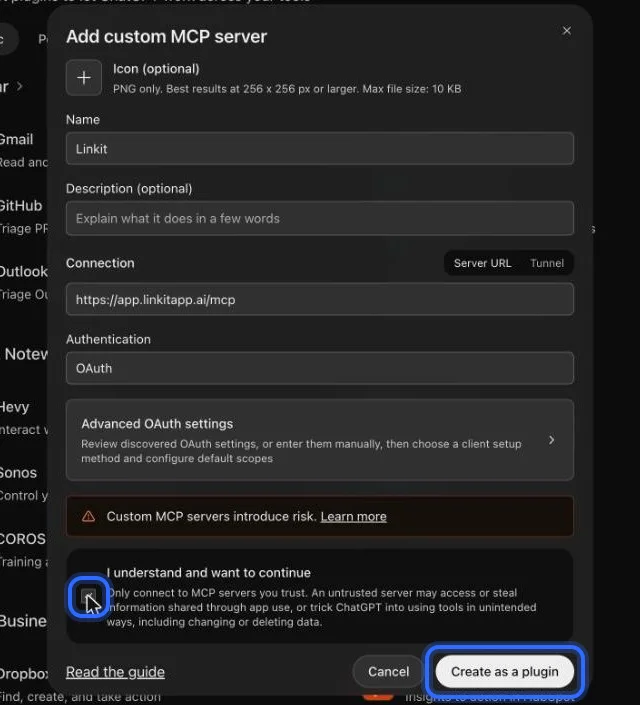
Name it Linkit, paste the address below, keep OAuth, tick “I understand”, then choose Create as a plugin.
6
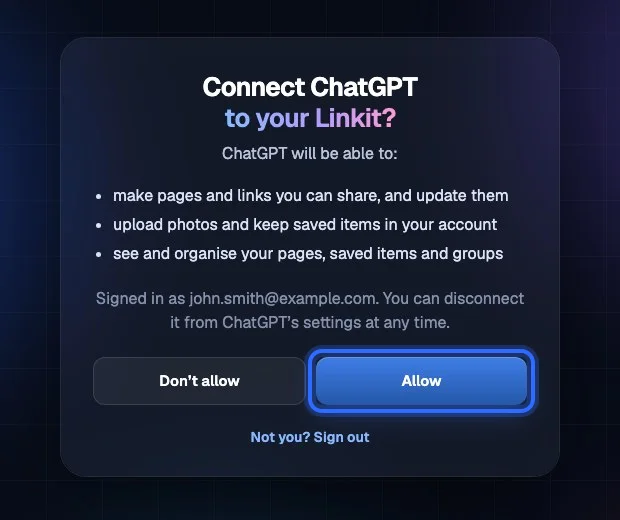
Sign in to Linkit and choose Allow.
7
In any chat, type @Linkit and pick it. Then ask for your page.
A page made from the answer, not the chat. It can hold what a chat can't: swipeable photo galleries, Google Maps, tap-to-call buttons, and votes or sign-ups everyone who opens the link sees. If plans change, ask ChatGPT and the same link updates.
Asked in ChatGPT: three condos and ten photos. On the right, what the client opens.
Which to use when
Which should I send?
Send the share link when they need to see how you got there. Send a Linkit when they just need the answer. For one short reply, copying the text or a single screenshot is still fastest; it stops working once the answer is longer than a screen, or has photos and links people need to tap.
ChatGPT share link
Linkit
Copy or screenshot
Shows your questions and drafts
Yes
No, just the result
Only what you copy
Opens without an account
Yes (personal accounts)
Yes
Yes
Photos, maps, buttons
As they appear in the chat
Laid out on the page
No
Votes and sign-ups
No
Yes
No
Change it after sending
Update the link
Ask your AI; same link
Send again
How long it lasts
Until you delete it
7 days on Free; with Pro, 1 hour to forever
Forever, in their chat
Works with Claude and Grok
ChatGPT only
Yes
Yes
Questions
More questions
Can people see my other ChatGPT chats?
No. A share link opens only that one conversation. A Linkit page shows only the page made from it.
Does the person I send it to need ChatGPT?
No. Both a ChatGPT share link from a personal account and a Linkit link open in any browser without an account.
Will messages I add later show up?
Not on a ChatGPT share link until you update it. With Linkit, ask ChatGPT to change the page and the same link shows the new version.
How do I stop sharing?
Delete the share link in ChatGPT, or delete the page in Linkit (or ask your AI). Either way the link stops working.
How do I share just one answer from a long chat?
Copy that message, or ask ChatGPT to “make this answer a Linkit”. You get a page with only that answer.
How long does a Linkit link last?
On Free, a link stays up 7 days. With Linkit Pro you choose: 1 hour, 5 hours, 1 day, 7 days, up to a year, or forever. On any plan you can delete a link sooner and it stops working at once.
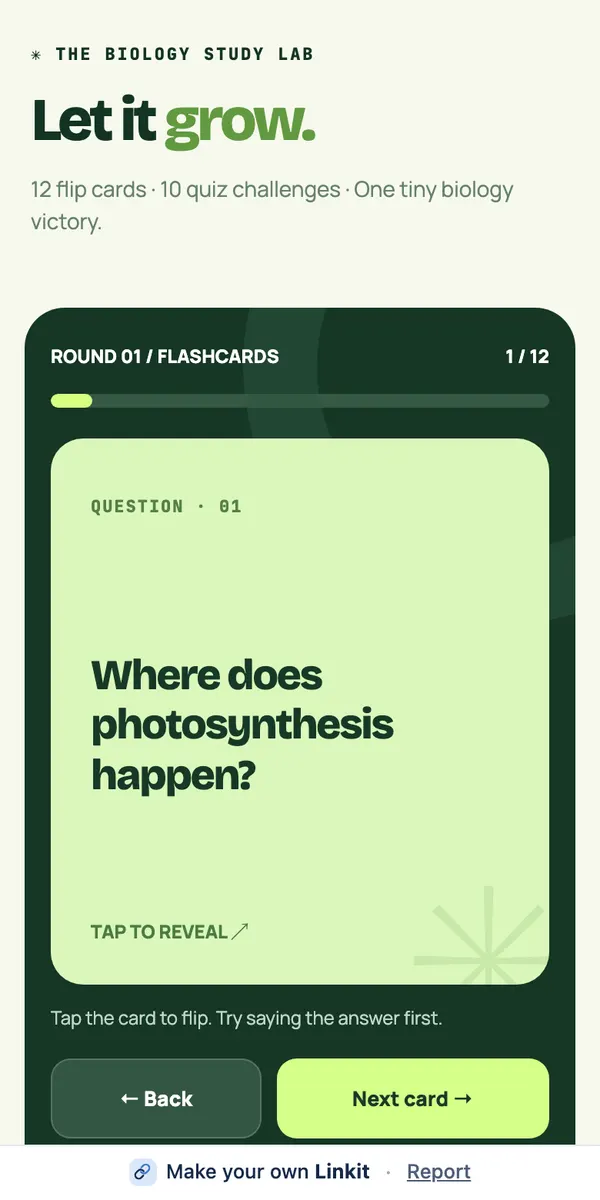
Sources and how we measured. OpenAI, ChatGPT shared links FAQ, checked October 18, 2026. Screen counts: we laid out each plan's full text like a chat reply on a 390-pixel-wide phone with 16-pixel text, then divided its height by the visible chat area (640 pixels). Photos weren't counted, so real screenshots would be more. The pages: Kyoto in April, Three Toronto condos, U8 Saturdays at Mile Square.
 linkit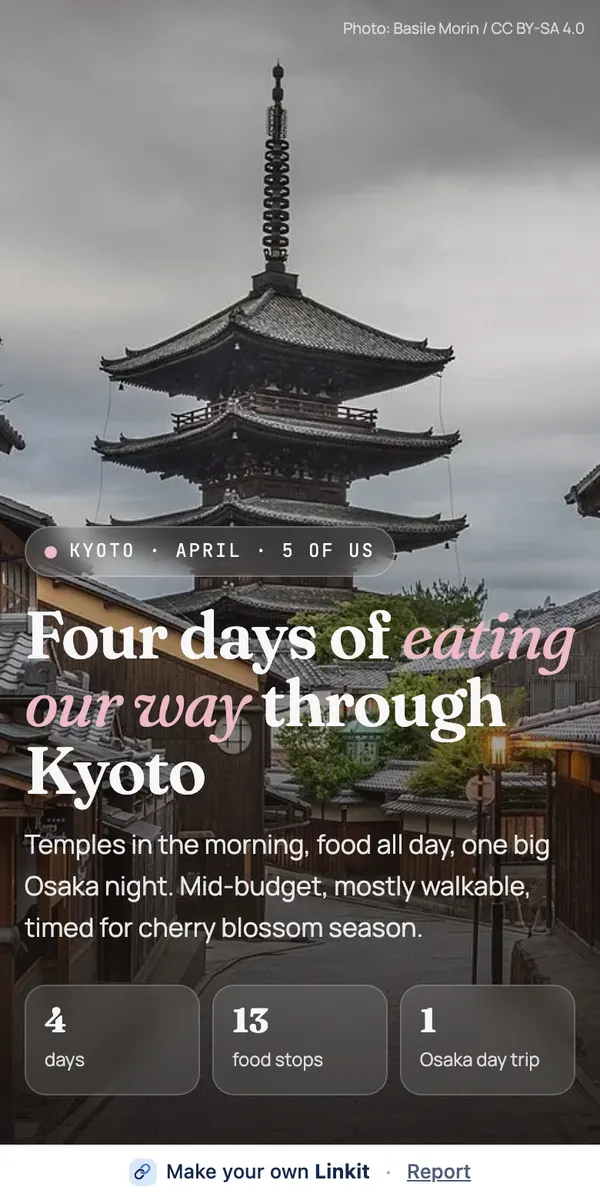
 ChatGPT share link vs. Linkit: which should you send?